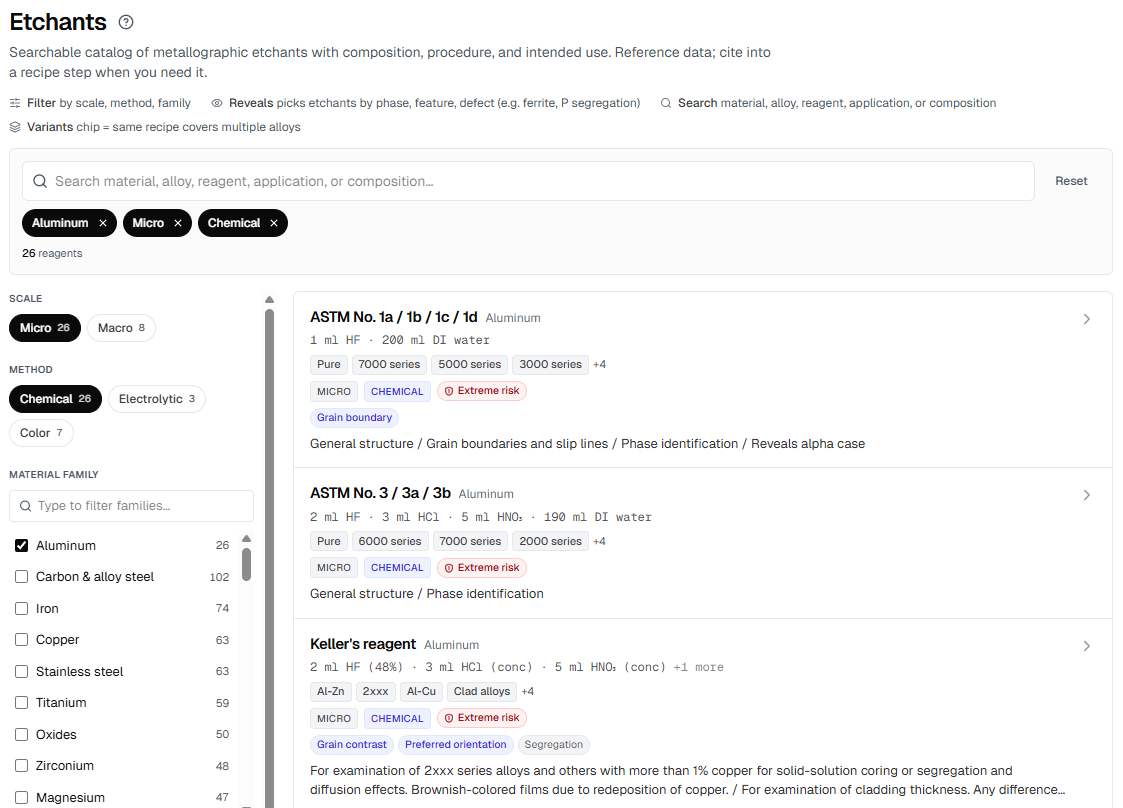
Search and filter by what matters.
Free-text across reagent name, composition, and application. Filter by material
family, alloy, micro vs macro, method, and the feature the etch reveals (grain
boundaries, phases, weld HAZ, prior austenite, P-segregation, and so on). Filter
counts update live.
Everything you need before you reach for the bottle.
Each entry shows composition and procedure as copyable blocks, the alloy pairs it
applies to, what it reveals, and a safety panel with PPE codes, GHS pictograms,
and disposal notes. Variants of the same reagent (Nital 2%, Nital 5%, Beraha I/II/III)
group into one card so you do not get duplicate rows.
Your lab’s own etchants, alongside the catalog.
Add custom etchants with the same fields plus a lab-private notes section for
operator tips and supplier hints. They appear in the browser next to the curated
entries, marked with your lab’s name, and never merge into the canonical
recipes. Retiring a custom etchant leaves existing recipe steps intact.
One click into a recipe, or ask Mai.
When you add an etch step to a recipe, the catalog opens as an Advisor pre-filled
with the sample’s material and alloy. One click drops composition and
procedure into the step. The Mai AI assistant can also search the catalog and
cite an entry directly in its reply.